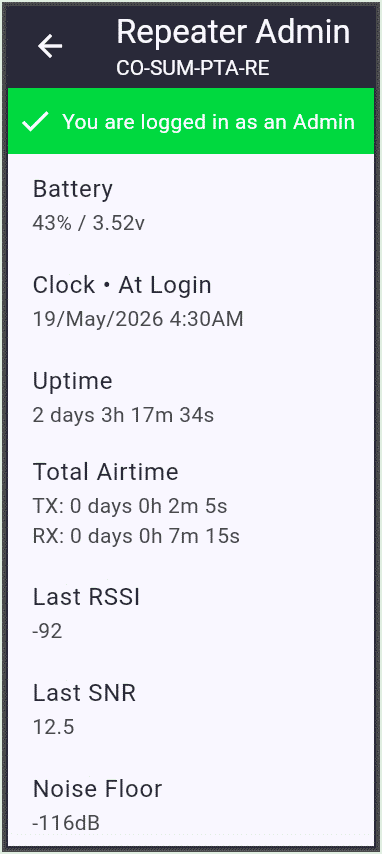
(Update: I am delighted to report that after a discharge-and-charge cycle, the batteries in this repeater are doing just fine. Not only that, but it turns out the batteries have an actual capacity that is better than the manufacturer’s claimed capacity. See followup blog article.)
Recently it became necessary to swap out an ailing repeater. The repeater had been purchased a few weeks ago and I deployed it, trusting that it would eventually charge up fully. But even after some weeks in service, the battery level hovered at around 43% and never even once got as high as 50%. The repeater was in a remote location, so the swap-out task was a bit of work. This blog article describes what made me realize I had a problem, what preparations and planning were needed, the swapping-out task itself, and the results.
It is only a couple of months ago that I began trying to learn about LoRa mesh equipment and systems. Early on in the process I purchased four Seeed Studio SenseCAP Solar Node P1-Pro repeaters (manufacturer web page). I deployed two of them near my home, one as a Meshtastic node and the other as a Meshcore repeater. Both are working fine. Each of them immediately charged itself up to 99% battery level and has stayed at or near that level over widely varying temperatures and cloudy or sunny weather. Part of what explains this happy result is that the solar panel can generate as much as five watts, while the load (the controller and LoRa radio and GNSS radio) tends to be less than a tenth of a watt. This means that in general the solar panel, even if shaded part of the day, and even with no sunlight at night, and even with plenty of overcast days, is very likely to be able to provide ten times the amount of power needed.
The batteries provide some 48 watt-hours, so that even with no charging at all, they would likely be able to power the electronics for well over three weeks.
The batteries are able to provide power to a load even when their temperature is as low as -40°C (-40°F), but it would ruin the batteries if someone were to try to charge them at a time when their temperature is below freezing. So a charging management circuit keeps track of the temperature and refrains from trying to charge the batteries if it is too cold. This does mean that the repeater could stop working if the ambient temperature were to remain consistently below freezing for longer than three weeks. But if the temperature could be above freezing for just a few minutes a day (during a sunny time), this would be enough to keep the device powered up enough to remain in uninterrupted service.
This left third and fourth repeaters remaining to be placed into service.
I then determined that a repeater was needed on a hill across the valley, so I powered up the third repeater, configured it, and deployed it. (You can read about the process in this blog article.) What became clear, however, is that it was failing to charge properly. Even after a week in service, the battery level hovered at around 43% and never even once got as high as 50%. You can see this in the screen shot above.
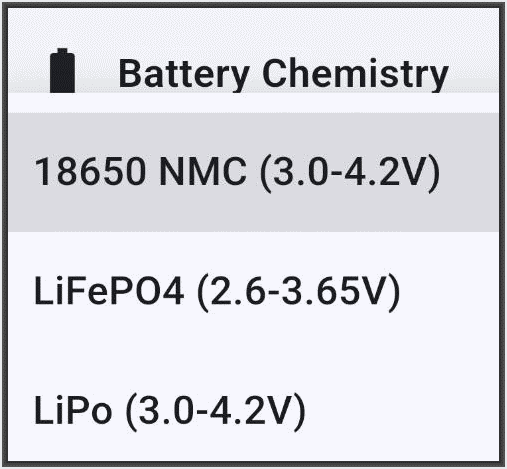
A first thing to wonder is whether somehow I had configured the firmware with a wrong battery chemistry. The default Meshcore repeater firmware (version 1.15.0, April 19, 2026) offers three choices for battery chemistry, seen at right. The default is the first setting (Nickel-Manganese-Cobalt). I wondered if somehow this was a wrong setting for the particular batteries that had been installed in the repeater by the manufacturer.
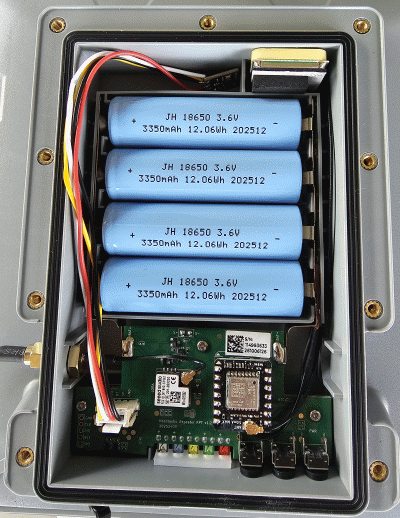
You can see the batteries at right and this is all of the writing. Nowhere does it reveal the chemistry. I wrote to the manufacturer asking which chemistry is used in the batteries, and the answer from Seeed’s field application engineer was:
The battery is 18650 lithium batteries (3350 mAh each).
The does not, of course answer the question. I wrote back to ask the question again, and the field application engineer answer that it is indeed NMC chemistry. (It is thus good news that the default setting in the Meshcore repeater firmware is “NMC”.)
It will be recalled that I had a fourth repeater that had not yet been placed into service. So I decided I had little choice but to swap it with the ailing repeater.
A first task was, of course, to try to figure out whether the fourth repeater maybe had the same charging problem as the third one. So I charged it up and it reached 99%. I figured that probably means it works okay. I configured it the same as the ailing repeater. I tested it on the bench and confirmed that it connects to other repeaters and could be remotely administrated.
I then needed to plan the swap process. A chief worry is the need to avoid any period of time during which either of the repeaters is “on” but does not have an antenna connected. (You will recall that I discussed this worry in this blog article.) Normally the way to deal with this is pretty simple — turn off the repeater before disconnecting its antenna. But it turns out that this Meshcore repeater firmware has no way to turn off the repeater. Pressing the power button does not turn it off. The only way to turn it off is to remove the bottom cover and pull the four batteries out. This would be easy enough for the repeater on my bench (the fourth repeater that was on the verge of being placed into service) but would be a terrible idea for the third repeater (the one that is already in service in the remote location).
Why would it be a terrible idea? One reason is the risk of dropping and losing some of the tiny screws that hold the cover in place. A second reason is that the bottom cover faces down, so is not easy to get at. One could detach the device from its mounting bracket, and then orient it so that the cover is facing up, and then unscrew the tiny screws, but then the device would be dangling from its antenna cable, risking damage to the cable (and then risking destruction of the RF transmission circuitry). This would also require having three hands.
It turns out that I was not the first to worry about this problem with this repeater and its firmware. There are internet discussion groups where people have talked about this. The workaround turns out to be:
- power up a companion device;
- connect to it using a smart phone;
- use the companion device to do remote administration of the repeater;
- enter the CLI (command line interface) window of the repeater;
- enter the following CLI commands:
- “get repeat” with an answer of “on”
- “set repeat off” with a confirmation that repeat is now “off”
- “get repeat” with an answer of “off” (just to make sure)
- “get tx” with some nonzero answer (probably the default value of “22”)
- “set tx 0” with an answer of “OK””
- “get tx” with an answer of “0” (to make sure)
This reduces to a minimum any risk of significant RF being sent to a (nonexistent) antenna.
So I practiced this on the fourth repeater. (In other words I did not use the “take out the four batteries” approach.) This meant that I could remove the mounting bracket and antenna cable from the fourth repeater. I also did not need the power tools from the earlier blog article. I was delighted to find that I would not need to use the large work bag that you saw in the earlier blog article. Instead I was able to fit everything I needed into a small backpack.
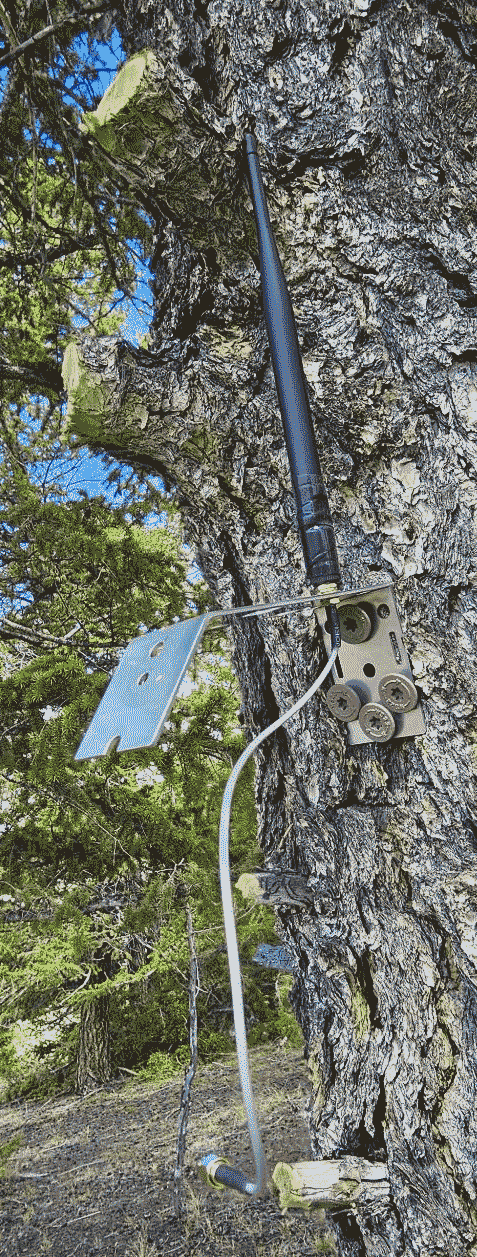
I then hiked to the remote location that is the site of the ailing repeater. I used the workaround to turn off the RF circuitry in the ailing repeater, then disconnected its antenna cable. I detached the repeater from the mounting bracket. What remained at the tree, as you can see at right, were the bracket, the antenna, and the antenna cable.
At which point I got a clue that I could have been smarter about how I assembled the repeater in the first place. There are two “D” holes where the antenna cable could be mounted to the bracket. One “D” hole is right next to the tree, and the other “D” hole is further from the tree and closer to the repeater. I moved the cable to the latter “D” hole. The result of course is that instead of blocking perhaps one-half of the would-be line-of-sight angles for the antenna, the tree would only block perhaps one-third of the would-be line-of-sight angles for the antenna.
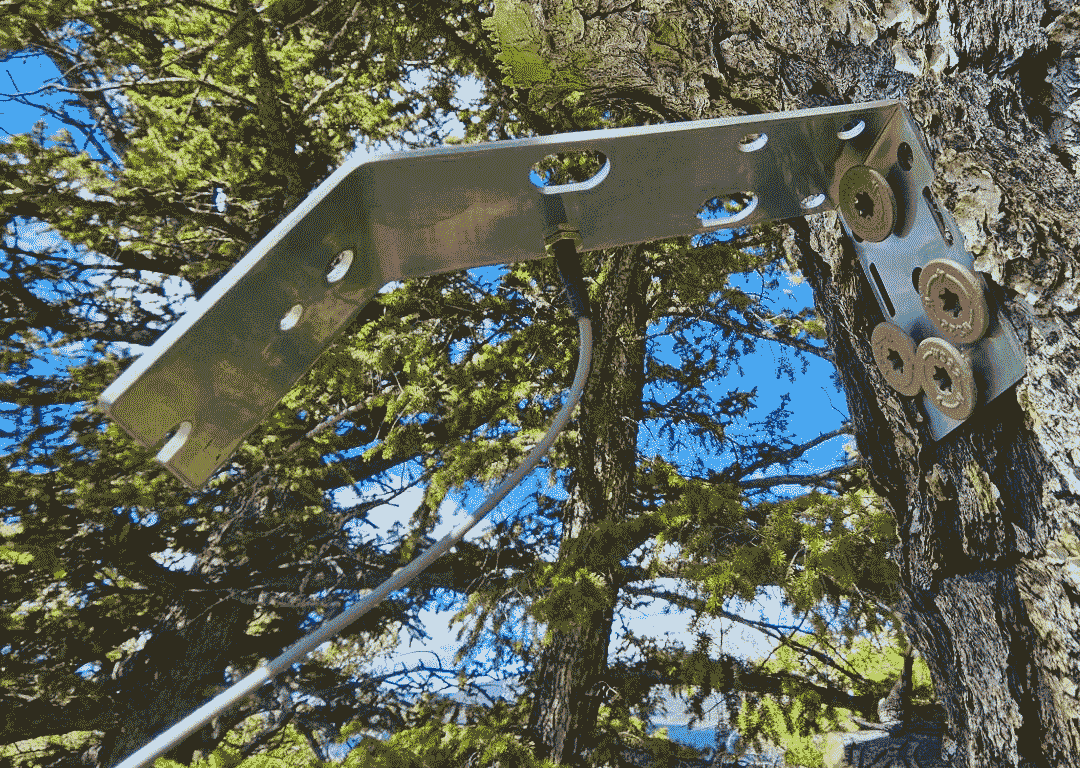
The photo at right shows the situation after I got a clue. The antenna, when reinstalled, would be maybe four inches from the tree instead of rubbing against the tree.
I then connected the antenna cable to the fourth repeater (the one that had never until now been in service) and secured it to the mounting bracket. I adjusted the angle bracket so that the solar panel was aimed correctly for the winter sun at our latitude. I then undid the workaround — using the CLI to restore transmit power to 22 and turning “repeat” on again. I then obtained a “neighbors” report to confirm that this fourth repeater was able to communicate with other repeaters, and hiked back down from the remote location.
By the time I was back home, the newly deployed fourth repeater had linked up with six nearby repeaters. The tree had been previously blocking line-of-sight to the “CO-SUM-HAM” repeater, and now we see a 9-dB SNR link to that repeater, which is very good news. Five other repeaters also have good links as you can see.
In my emails with Seeed’s field application engineer, she suggested a number of troubleshooting steps to be done on the bench. Now that the ailing repeater is on the bench, I will do the troubleshooting. Maybe it will be possible to coax the repeater to charge normally, or maybe it will be necessary to send it back to Seeed for warranty replacement. I’ll keep you posted.
Leave a Reply